> ## Documentation Index
> Fetch the complete documentation index at: https://docs.champ.ai/llms.txt
> Use this file to discover all available pages before exploring further.
# Trigger cases with incoming webhooks
> Start a case workflow by sending a webhook from any external system
An **incoming webhook** lets an external system start a case workflow by POSTing JSON to a secret URL. Every request
creates one case: the JSON object becomes the case's attributes, and the workflow's automation starts right away.
Use it when the sending system can call a URL on an event (a form submission, a file upload, a record change) but
can't easily send an API token or reshape its payload. If you control the sender and want to read cases back or
update their status, use the [cases API](/integrations/cases-api) instead. Both create the same kind of case.
The flow is:
1. Publish a **direct case workflow** whose attributes match the fields the sender will post.
2. Generate the workflow's webhook URL in the dashboard.
3. Point the external system at that URL. Each POST creates a case and runs the workflow.
## Generate the webhook URL
1. Open the direct case workflow in the dashboard and make sure it's **published**.
2. Open the **Case Configuration** tab, expand **Case Sources**, and click **Incoming Webhook**.
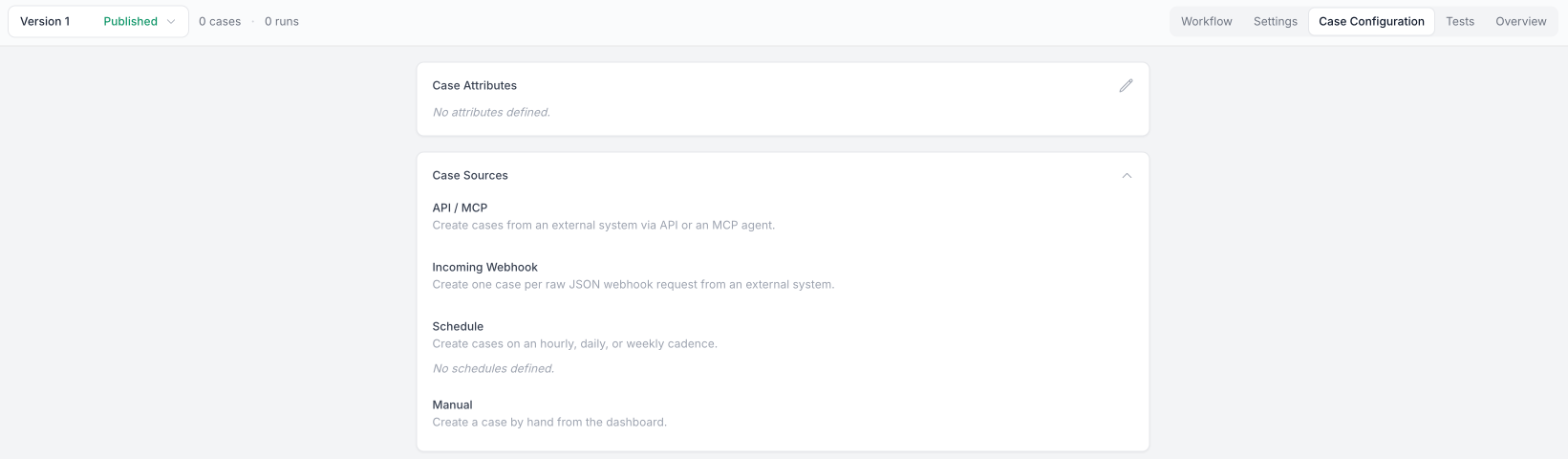 3. Click **Generate webhook URL** and copy the URL. The dialog also shows a ready-to-run curl example.
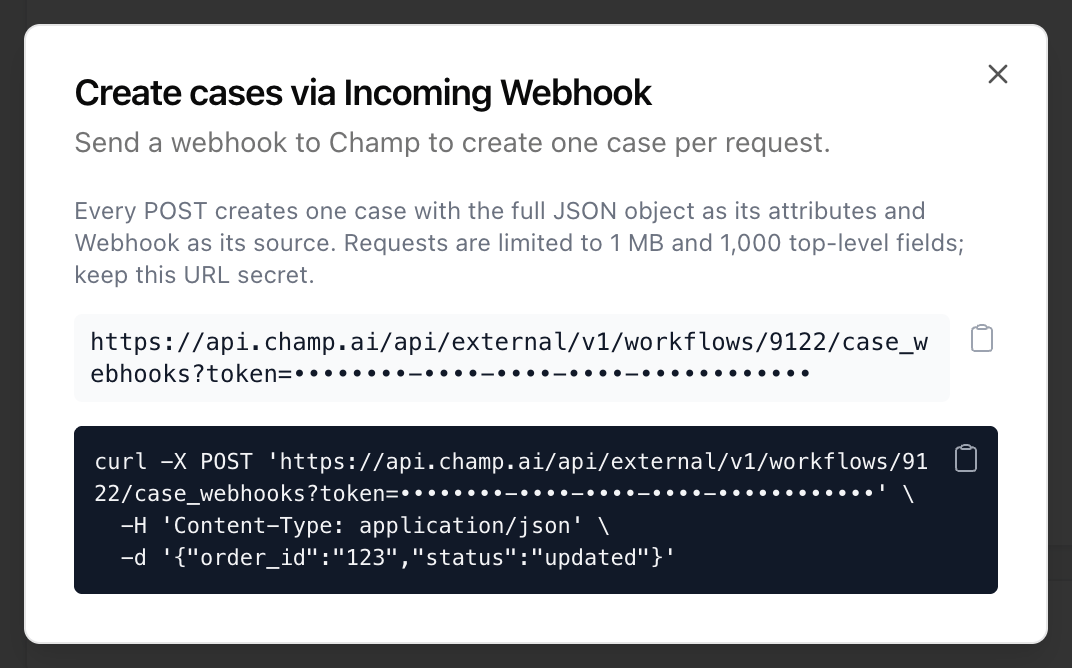 You need edit access to the workflow to generate or view the URL. Each workflow has one webhook URL, and it stays the
same across later versions of the workflow.
The URL looks like this:
```
https://api.champ.ai/api/external/v1/workflows/{WORKFLOW_ID}/case_webhooks?token={TOKEN}
```
The `token` is not an [API token](/integrations/cases-api#create-an-api-token). It's a separate secret generated for
this workflow only. It can create cases on this workflow and nothing else: it can't read or update cases, and it
doesn't work for any other workflow or endpoint. Because it travels in the URL, the sender doesn't need to set an
`Authorization` header, and any header it does send is ignored.
The `token` in the URL is the credential: anyone who has the URL can create cases on the workflow. Store it the
way you would an API token, in a secrets manager or environment variable, and don't paste it into tickets or logs.
Ask Champ to rotate it if it's ever exposed.
## Send a webhook
POST any JSON object to the URL. No `Authorization` header is needed.
```bash theme={null}
curl -X POST 'https://api.champ.ai/api/external/v1/workflows/{WORKFLOW_ID}/case_webhooks?token={TOKEN}' \
-H 'Content-Type: application/json' \
-d '{"submission_id": "abc123", "form": "claims_docs", "submitted_at": "2026-10-15T17:04:12Z"}'
```
Each top-level key in the body becomes a case attribute with the same name. Values keep their JSON types, so nested
objects and arrays come through as-is.
The request returns `201 Created` as soon as the case exists. The workflow runs asynchronously, so the response
doesn't wait for it:
```json theme={null}
{ "case": { "id": 987, "source_type": "Webhook" } }
```
Cases created by a webhook:
* Start in the `Open` status, like every new case.
* Are `live` cases. There is no test mode on this endpoint; use the [cases API](/integrations/cases-api#test-cases)
with `"mode": "test"` for staging traffic.
* Get a timestamped subject such as `Claims Intake via Webhook - 2026-10-15 17:04:12 UTC`.
* Show **Webhook** as their source in the dashboard.
Every request creates a new case, including retries of the same event. If your sender retries on timeouts,
include a stable event ID in the payload so the workflow can recognize duplicates.
## Matching the workflow's attributes
The payload is validated against the workflow's case attributes before the case is created:
* Every **required** (non-nullable) attribute must be present.
* Values for declared attributes must match their types.
* Keys the workflow doesn't declare are kept as extra attributes. On workflows marked as handling sensitive data,
undeclared keys are rejected instead, so that nothing is stored without its sensitivity setting.
If validation fails, the request returns `422` and no case is created. Each entry in `validation_errors` points to
the offending field with a [JSON Pointer](https://datatracker.ietf.org/doc/html/rfc6901):
```json theme={null}
{
"error": "attributes_validation_failed",
"validation_errors": [
{ "path": "", "error": "object at root is missing required properties: submission_id" }
]
}
```
Most webhook senders have a fixed payload shape you can't change. Declare the attributes the workflow needs as
required, and leave the rest of the sender's fields undeclared or optional so a new field on their side doesn't
start failing requests.
## Pattern: send a notification, let the workflow fetch the details
You don't have to put everything in the webhook. A common setup is to send a small notification, such as an event
ID and some metadata, and let the workflow decide what to do with it:
1. The external system sends a webhook with the item's ID and the details needed to decide whether it's in scope.
2. The workflow checks those details. If the item is out of scope, it closes the case without accessing anything else.
3. If it is in scope, the workflow calls the source system's API through a
[REST API integration](/integrations/rest-api) to download only the files or records it needs.
This keeps sensitive content out of the webhook body, and Champ only reads data it's actually going to work on.
The REST integration holds the source system's credentials, so the sender doesn't have to share them.
## Following up on a case
The webhook response only returns the case ID. To follow the case after that:
* [Subscribe to webhook events](/webhooks/subscriptions) to be notified when the case is closed or errors.
* Fetch the case with the [cases API](/integrations/cases-api#fetch-a-case) using an API token.
## Limits
| Limit | Value |
| - | - |
| Request body size | 1 MB |
| Top-level attributes | 1,000 |
To send files larger than this, send a reference to them (an ID or URL) and have the workflow download them, as in
the [pattern above](#pattern-send-a-notification-let-the-workflow-fetch-the-details).
## Errors
| Status | When |
| - | - |
| `401` | The URL's workflow ID or token is wrong, or the workflow is no longer a published direct case workflow. |
| `413` | The body is larger than 1 MB or has more than 1,000 top-level keys. |
| `422` | The body isn't a JSON object, or it failed attribute validation. |
Errors return a JSON body with an `error` message.
This documentation is built and hosted on [Mintlify](https://mintlify.com), a developer documentation platform.
You need edit access to the workflow to generate or view the URL. Each workflow has one webhook URL, and it stays the
same across later versions of the workflow.
The URL looks like this:
```
https://api.champ.ai/api/external/v1/workflows/{WORKFLOW_ID}/case_webhooks?token={TOKEN}
```
The `token` is not an [API token](/integrations/cases-api#create-an-api-token). It's a separate secret generated for
this workflow only. It can create cases on this workflow and nothing else: it can't read or update cases, and it
doesn't work for any other workflow or endpoint. Because it travels in the URL, the sender doesn't need to set an
`Authorization` header, and any header it does send is ignored.
The `token` in the URL is the credential: anyone who has the URL can create cases on the workflow. Store it the
way you would an API token, in a secrets manager or environment variable, and don't paste it into tickets or logs.
Ask Champ to rotate it if it's ever exposed.
## Send a webhook
POST any JSON object to the URL. No `Authorization` header is needed.
```bash theme={null}
curl -X POST 'https://api.champ.ai/api/external/v1/workflows/{WORKFLOW_ID}/case_webhooks?token={TOKEN}' \
-H 'Content-Type: application/json' \
-d '{"submission_id": "abc123", "form": "claims_docs", "submitted_at": "2026-10-15T17:04:12Z"}'
```
Each top-level key in the body becomes a case attribute with the same name. Values keep their JSON types, so nested
objects and arrays come through as-is.
The request returns `201 Created` as soon as the case exists. The workflow runs asynchronously, so the response
doesn't wait for it:
```json theme={null}
{ "case": { "id": 987, "source_type": "Webhook" } }
```
Cases created by a webhook:
* Start in the `Open` status, like every new case.
* Are `live` cases. There is no test mode on this endpoint; use the [cases API](/integrations/cases-api#test-cases)
with `"mode": "test"` for staging traffic.
* Get a timestamped subject such as `Claims Intake via Webhook - 2026-10-15 17:04:12 UTC`.
* Show **Webhook** as their source in the dashboard.
Every request creates a new case, including retries of the same event. If your sender retries on timeouts,
include a stable event ID in the payload so the workflow can recognize duplicates.
## Matching the workflow's attributes
The payload is validated against the workflow's case attributes before the case is created:
* Every **required** (non-nullable) attribute must be present.
* Values for declared attributes must match their types.
* Keys the workflow doesn't declare are kept as extra attributes. On workflows marked as handling sensitive data,
undeclared keys are rejected instead, so that nothing is stored without its sensitivity setting.
If validation fails, the request returns `422` and no case is created. Each entry in `validation_errors` points to
the offending field with a [JSON Pointer](https://datatracker.ietf.org/doc/html/rfc6901):
```json theme={null}
{
"error": "attributes_validation_failed",
"validation_errors": [
{ "path": "", "error": "object at root is missing required properties: submission_id" }
]
}
```
Most webhook senders have a fixed payload shape you can't change. Declare the attributes the workflow needs as
required, and leave the rest of the sender's fields undeclared or optional so a new field on their side doesn't
start failing requests.
## Pattern: send a notification, let the workflow fetch the details
You don't have to put everything in the webhook. A common setup is to send a small notification, such as an event
ID and some metadata, and let the workflow decide what to do with it:
1. The external system sends a webhook with the item's ID and the details needed to decide whether it's in scope.
2. The workflow checks those details. If the item is out of scope, it closes the case without accessing anything else.
3. If it is in scope, the workflow calls the source system's API through a
[REST API integration](/integrations/rest-api) to download only the files or records it needs.
This keeps sensitive content out of the webhook body, and Champ only reads data it's actually going to work on.
The REST integration holds the source system's credentials, so the sender doesn't have to share them.
## Following up on a case
The webhook response only returns the case ID. To follow the case after that:
* [Subscribe to webhook events](/webhooks/subscriptions) to be notified when the case is closed or errors.
* Fetch the case with the [cases API](/integrations/cases-api#fetch-a-case) using an API token.
## Limits
| Limit | Value |
| - | - |
| Request body size | 1 MB |
| Top-level attributes | 1,000 |
To send files larger than this, send a reference to them (an ID or URL) and have the workflow download them, as in
the [pattern above](#pattern-send-a-notification-let-the-workflow-fetch-the-details).
## Errors
| Status | When |
| - | - |
| `401` | The URL's workflow ID or token is wrong, or the workflow is no longer a published direct case workflow. |
| `413` | The body is larger than 1 MB or has more than 1,000 top-level keys. |
| `422` | The body isn't a JSON object, or it failed attribute validation. |
Errors return a JSON body with an `error` message.
This documentation is built and hosted on [Mintlify](https://mintlify.com), a developer documentation platform.